Practical guidance
Making better infographics with ChatGPT
A worked example: use ChatGPT to gather the right context, write an infographic design specification, generate a draft image, and then decide what needs improving.
This page uses an ENCORE infographic as a learning example. It is not an official UNEP-WCMC product or an authoritative guide to ENCORE.
Steps to generate infographics with LLM + Image models
Key takeaways
Load the conversation first
The image generator can use earlier messages. Give it the facts, audience, purpose, and constraints it needs, or ask ChatGPT to research the topic first.
Use design specs
Ask for one or more professional design specs before generating the image. Say what to focus on, then iterate on the spec until it feels right.
Generate from the spec
Once the spec contains the right message, structure, and caveats, ask for the image. Treat the first result as a draft.
The conversation
The important pattern is prompt, written spec, then image. I have shortened the long response here, but kept its structure.
Prompt
Research how the ENCORE natural capital tool works and then write a design spec for an infographic that explains (i) what it is (ii) what its purpose is (iii) how to use it (iv) what outputs you get from it. Aim it at a non-technical sustainability person from a financial institution. Focus on pedagogical clarity
ChatGPT response
ChatGPT wrote a design spec rather than generating an image immediately. The response had these seven sections:
1. Infographic objective
Set the one-page aim and the core message: ENCORE as a first-step screening tool, not a final risk score.
2. Recommended title and subtitle
Suggested a title, subtitle, and source note for the infographic.
3. Target audience
Named the likely reader, assumed knowledge level, and tone.
4. Visual structure: 5-panel vertical journey
Outlined panels covering what ENCORE is, why it exists, how it works, how to use it, and what outputs it gives.
5. Pedagogical design principles
Suggested repeated metaphors, definitions, and finance-language pairings to make the topic easier to follow.
6. Suggested layout
Described format, hierarchy, style, and icon choices.
7. Footer/source note
Added a caveat about screening, prioritisation, and the need to contextualise results.
Prompt
Create the infographic from the design spec.
ChatGPT response
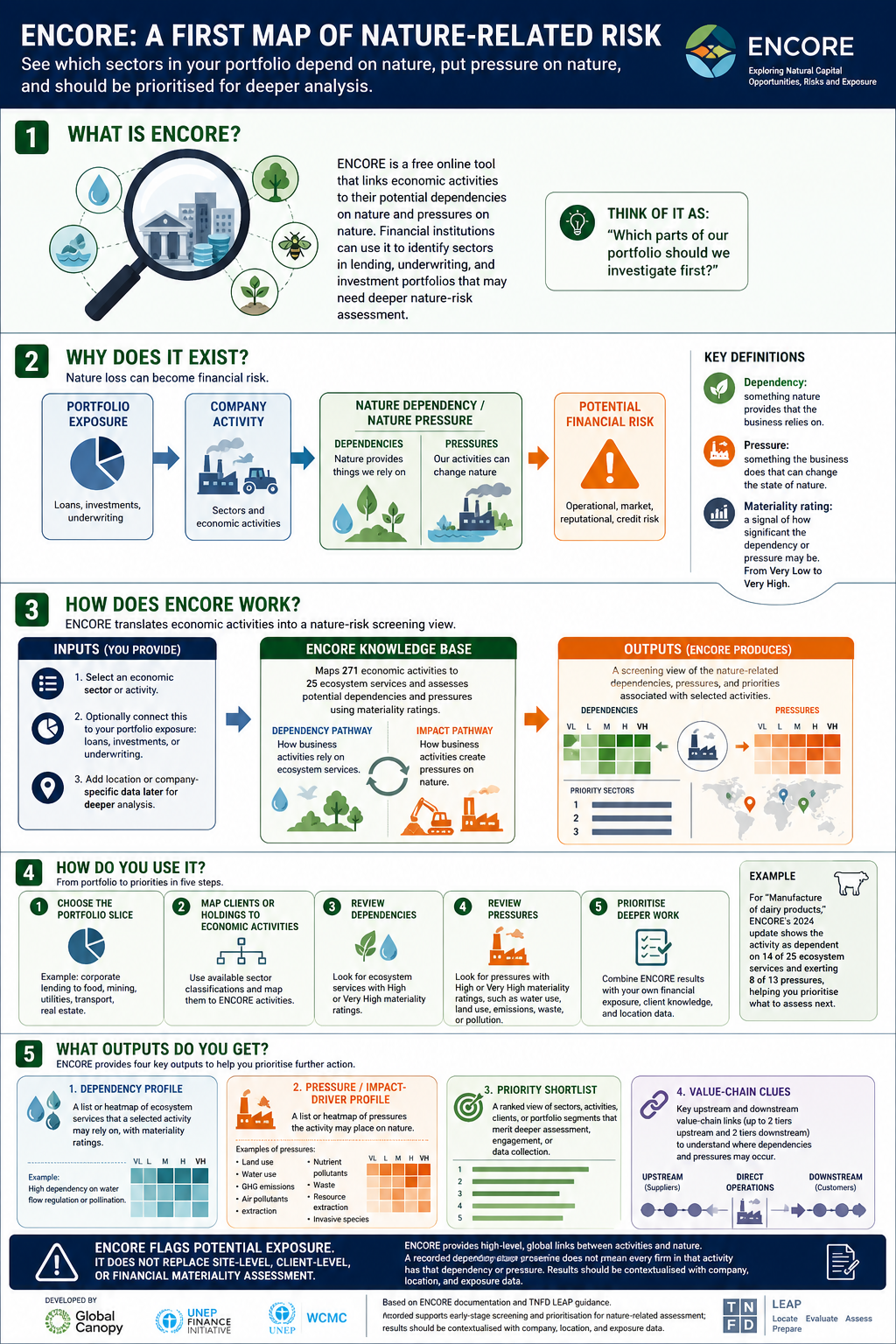
Generated infographic draft
ChatGPT used the design spec and generated the ENCORE infographic below. The next step is still human judgement: check the facts, legibility, and design quality, then iterate.
Final infographic draft
Open the image in a new tab to inspect detail and legibility.
Practical notes
Why this helped
The chat already contained audience, purpose, context, caveats, and a proposed structure before the image was generated.
What to copy
Build up the conversation first. Ask for research if needed, then ask for design specs and iterate on the best one.
What to avoid
Do not treat a polished image as proof that the content is right. Check claims, caveats, labels, and readability.
Reusable prompt template
You are helping me make a professional infographic.

Audience:
[Who exactly is this for? What do they already know?]

Purpose:
[What should the reader understand or do after seeing it?]

Source material:
[Paste notes, links, transcript, report extract, or verified facts.]

Task:
1. Make sure this chat contains the information the image generator needs. Use the source material above, or research the topic first if needed.
2. Write one or more professional infographic design specs before generating an image.
3. Tell me what each spec is trying to optimise for, for example clarity, audience fit, hierarchy, or visual simplicity.
4. Let me iterate on the spec until I am happy with it.
5. Once the spec is agreed, generate the infographic from that spec.

Constraints:
- Do not add unsupported facts.
- Make caveats visible.
- Use plain language for a non-specialist audience.
- Prioritise legibility and clear visual hierarchy.
- Treat the first image as a draft to improve.
Checklist for strong ChatGPT infographics
- Make sure the chat contains the information the image needs.
- Define the audience and purpose before asking for an image.
- Ask for research or source analysis if the topic needs it.
- Ask for one or more design specs before asking for generation.
- Iterate on the spec until the structure and emphasis are right.
- Check every factual claim against source material.
- Inspect legibility, hierarchy, and reading order.
- Review layout, contrast, hierarchy, and reading order.
- Treat the first generated image as a draft.